Social Media Marketing for Small Businesses: The Practical 2026 Guide
Social media marketing for a small business works best as a simple system: complete your Google Business Profile, pick one or two social platforms your customers use (usually Instagram plus Facebook or LinkedIn), post three to five times a week across four content types (products, proof, people and promotions) and review results monthly. Consistency beats volume.
Big brands have social media teams. Small businesses have the owner, a phone and maybe twenty spare minutes between customers. The good news is that small businesses don't need to copy big brands. They need a simple system that fits a busy week and actually brings customers through the door.
This guide gives you that system. You'll learn which platforms are worth your time, what to post, how often, what to spend and how to measure results, plus a 30-day plan you can start this week. It works for any small business, from a bakery in Manchester to a mobile shop in Gurugram.
Is social media marketing worth it for a small business in 2026?
Yes, because your customers are already there. In 2026, DataReportal's Digital 2026 report counts 5.66 billion social media user identities, equal to 68.7% of the world's population. Online adults use an average of 6.75 platforms a month. A small business doesn't need all of them, just the right one or two.
Social media also does something your shop sign can't: it reaches people before they need you. Someone who saw your new menu last week remembers you when they're hungry today. The same report notes that more than 30% of adult internet users discover new brands through ads on social platforms.
What social media won't do is fix a weak offer. If your prices, service or location don't suit your customers, posting more won't change that. Treat social media as the way you show people a business that's already worth choosing.
DataReportal's Digital 2026 Global Overview Report counts 5.66 billion social media user identities, 68.7% of the world's population, with online adults using an average of 6.75 social platforms each month. For a small business, the challenge is choosing where to show up, not whether customers are online.
Which social media platforms should a small business use?
Start with a Google Business Profile, then add one or two social platforms where your customers spend time. For most local and consumer businesses that means Instagram, often with Facebook. Professional services usually do better on LinkedIn. Video-first businesses can add YouTube. Being active in two places beats being absent from six.
| Business type | Start with | Add later |
|---|---|---|
| Shop, boutique, café, salon | Google Business Profile, Instagram | Facebook, YouTube Shorts |
| Restaurant or bakery | Google Business Profile, Instagram | |
| Consultant, agency, B2B service | LinkedIn, Google Business Profile | YouTube, X |
| Gym, studio, coaching | Instagram, Google Business Profile | YouTube |
| Trades and home services | Google Business Profile, Facebook |
Why Google first? For local businesses, the profile appears exactly when someone searches for what you sell nearby. Google's local ranking guide says results are based on relevance, distance and prominence, and recommends complete details, reviews and photos. Our Google Business Profile posts guide covers the weekly posting side.
How do you set up your business profiles properly?
Use the same business name, logo and description on every platform, switch Instagram to a professional account, and add one clear way to contact you. Consistent details help customers recognise you across apps and help search engines connect your profiles to the same business. Setting this up once takes about an hour.
- Name and handle: keep them identical or as close as possible everywhere.
- Profile photo: your logo or shop front, cropped to read well as a small circle.
- Bio: what you sell, where you are and why someone should choose you, in one or two lines.
- Contact: one link to your website or a messaging app, plus your opening hours.
- Professional account: on Instagram this turns on Insights and post scheduling.
What should a small business post on social media?
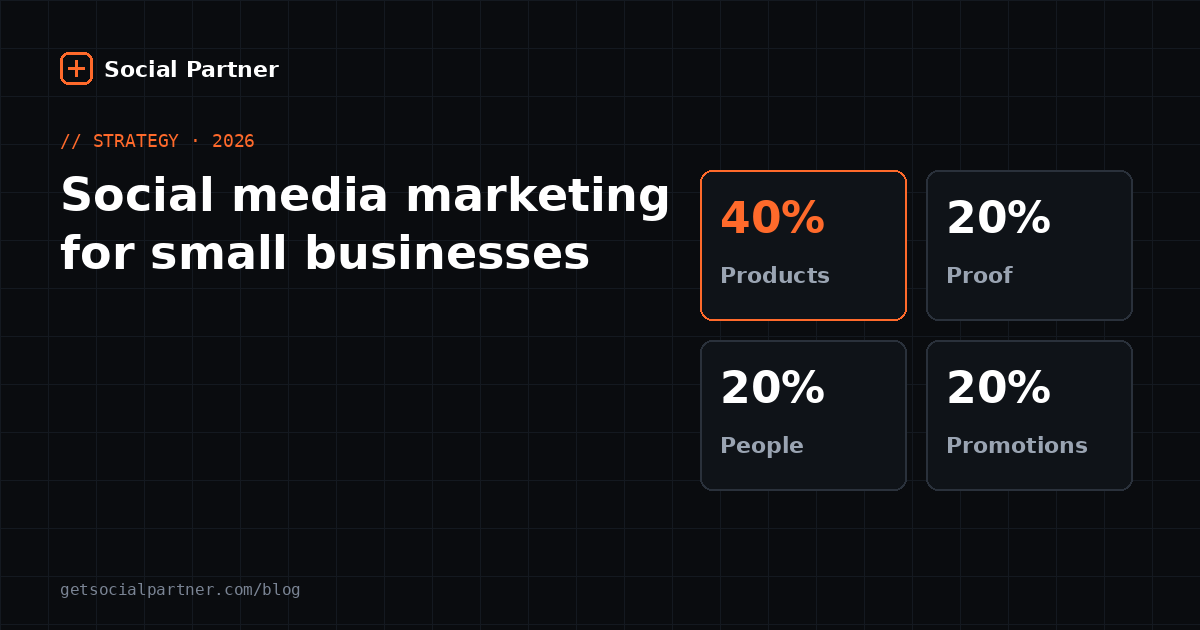
Rotate four content types, which we call the four Ps: Products (what you sell), Proof (reviews and results), People (you, your team and customers) and Promotions (offers and events). Each one answers a question a customer has before buying, and rotating them stops your feed from feeling like a non-stop advert.
| Type | Customer question it answers | Examples | Share of posts |
|---|---|---|---|
| Products | What do you have? | New arrivals, how-to-use videos, comparisons | About 40% |
| Proof | Can I trust you? | Reviews, before-and-after, customer photos | About 20% |
| People | Who are you? | Owner story, team, behind the scenes | About 20% |
| Promotions | Why buy now? | Offers, festival deals, events | About 20% |
Our take The percentages are a starting balance, not a rule. A café might run more Products posts; a clinic might lean on Proof. What matters is that customers see variety. For a long list of ready-made ideas in each category, see our 60 social media post ideas for local shops.
How often should a small business post?
Aim for three to five feed posts or Reels a week on your main platform, one Google Business Profile post a week and Stories whenever something happens. That's enough to stay visible without burning out. Consistency matters more than frequency: a steady three posts a week for a year beats a burst of daily posts that stops after a month.
| Platform | Starting target | Notes |
|---|---|---|
| 3–5 posts or Reels a week | Stories on most days | |
| 3 posts a week | Can reuse Instagram content | |
| Google Business Profile | 1 post a week | Offers and updates |
| 2–3 posts a week | Best for B2B | |
| YouTube | 1 Short or video a week | Reuse Reels as Shorts |
Timing helps too. If your customers are in India, our guide to the best time to post on Instagram in India gives day-by-day slots in IST.
How much should a small business spend on social media?
You can start with nothing but time. Profiles, posting, basic analytics and in-app scheduling are free. Spend money when it buys back time or reach: a scheduling tool once you manage several platforms, and small paid ads once you know which posts get the best response. Test ads with a small budget before increasing it.
- ₹0 / $0 a month: post yourself, schedule in the Instagram app or Meta Business Suite, use Insights.
- Low monthly budget: add a scheduling tool for multiple platforms and AI caption help. Compare options in our scheduling tools guide.
- Growth budget: boost your best-performing posts to people near your business, and test one change at a time.
How do you measure social media results?
Measure actions that lead to money: calls, messages, direction requests, website clicks and customers who say "I saw you on Instagram". Likes and follower counts are useful signals but poor goals. Review once a month, note which posts brought enquiries and make more of those.
- Weekly: glance at reach and saves to spot posts that are taking off.
- Monthly: compare calls, messages and direction requests with last month.
- Every quarter: drop the content type that never brings enquiries and try a new one.
A simple habit: ask new customers how they found you and keep a tally by the till. It's the most honest analytics you'll ever have.
How should small businesses in India approach social media?
Lean on Instagram, YouTube and Google, plan around festivals and write the way your customers speak. According to DataReportal's Digital 2026: India report, about 481 million people in India can be reached on Instagram, 500 million on YouTube and 403 million on Facebook, with internet users passing 1 billion.
- Festivals drive buying: plan Diwali, Holi, Eid, Raksha Bandhan and wedding-season posts weeks ahead.
- Language: English, Hindi or Hinglish captions are all fine. Use what your customers use.
- Messaging: many customers prefer to message before buying, so make your chat link easy to find.
- Payments: mention UPI acceptance; it removes a reason to hesitate.
A 30-day social media plan for a small business
Spend the first week setting up, then post on a steady rhythm for three weeks and review at the end. This plan assumes about two hours in week one and one hour a week after that. It's deliberately simple, so you'll actually finish it.
| Week | Focus | Tasks |
|---|---|---|
| 1 | Set up | Complete Google Business Profile, switch Instagram to professional, match bios and links, take 20 photos |
| 2 | Start posting | Schedule 3 posts (Products, People, Promotions) and 1 Google post |
| 3 | Add proof | Ask 3 customers for reviews or photos; schedule 4 posts including 1 Proof post |
| 4 | Review | Schedule 4 posts; on day 30, compare reach, messages and calls with week 1 |
What mistakes should small businesses avoid on social media?
The biggest mistakes are joining too many platforms, posting only adverts, disappearing for weeks and ignoring messages. Each one wastes the effort you've already put in. Fix them by staying small, mixing content types, scheduling ahead and replying to every comment and message within a day.
- Too many platforms: two active accounts beat six abandoned ones.
- All ads, no story: people follow businesses, not catalogues.
- Going quiet: a feed last updated months ago makes customers wonder if you're still open.
- Slow replies: a message is a customer asking to buy. Answer it.
- Stock photos: real photos of your products and people build more trust.
If staying consistent is the hard part, Social Partner lets you schedule a week of posts to Instagram, Facebook, Google Business Profile, YouTube, LinkedIn and X in one sitting, with free AI captions. See pricing or how it works.
Post at the right time, automatically
Schedule a week of Instagram, Facebook and Google posts in one sitting. Social Partner publishes them at your best time, with free AI captions.
Frequently asked questions
Which social media platform is best for a small business?
It depends on who your customers are. Most local businesses should start with a Google Business Profile, because it appears when people search nearby, plus Instagram for visual products. B2B services usually do better on LinkedIn. Pick the one or two places your customers already spend time.
How often should a small business post on social media?
Three to five feed posts a week on your main platform is a realistic target, plus one Google Business Profile post weekly. Stories can be daily. It's better to post three times every week for a year than daily for a month and then stop.
Can I do social media marketing for free?
Yes. Creating profiles, posting, using Instagram Insights and scheduling in the Instagram app or Meta Business Suite are all free. Money becomes useful for two things: paid ads to reach new people faster, and tools that save time when you manage several platforms.
How long does social media marketing take to show results?
Expect early signs, such as more profile visits, saves and messages, within four to eight weeks of consistent posting. Steady customer flow from social media usually takes three to six months, because people need to see a business several times before they trust it.
Should a small business hire a social media agency?
Only when you have a clear budget and goals. Many small businesses get good results by posting themselves with a scheduling tool and an hour a week of planning. An agency makes more sense for paid ad campaigns, video production or when the owner truly has no time.
What should I measure on social media?
Track actions that lead to sales: calls, direction requests, website clicks, messages and in-store mentions. Supporting signals include reach, saves and shares. Review them once a month and repeat the post types that bring the most enquiries.
Summary
- Start with Google Business Profile plus one or two platforms your customers use.
- Rotate the four Ps: Products, Proof, People, Promotions.
- Post three to five times a week, scheduled in one weekly session.
- Measure calls, messages and visits, and review monthly.
- Follow the 30-day plan, then repeat what worked.
Sources
- DataReportal, “Digital 2026: Global Overview Report”. https://datareportal.com/reports/digital-2026-global-overview-report (retrieved 18 October 2026)
- DataReportal, “Digital 2026: India”. https://datareportal.com/reports/digital-2026-india (retrieved 18 October 2026)
- Google Business Profile Help, “Tips to improve your local ranking on Google”. https://support.google.com/business/answer/7091 (retrieved 18 October 2026)
Figures checked on 18 October 2026.